
SuperBox Time Shift: The Ultimate TV Feature

SUPERBOX has introduced its sixth-generation SUPERBOX S6 series, include SUPERBOX SUPREME, SUPERBOX S6 ULTRA, SUPERBOX S6 MAX and SUPERBOX S6 PRO, which have a game-changing innovation named Time Shift. This upgrade is more than simply a fix, it represents a significant improvement over what is currently available on Android TV boxes. Customers are curious about this function, which allows them to rewind, pause, and play live TV like never before. In any case, SUPERBOX’s functionality improves your TV experience and gives you more control over your entertainment.
Reviewers and experts describe SUPERBOX’s this new Time Shift feature a game changer. Unlike the outdated versions seen on other Android TV boxes, this function is speedier, more intuitive, and extremely user-friendly. Furthermore, many people enjoy how simple it is to use, with no complex processes or delays. The upgrading is so smooth that even tech beginners can handle it like a pro. As a result, this invention defines SUPERBOX, demonstrating that we are not only following trends, but also creating them.
What is Time Shift ?
Time Shift on IPTV
Time Shift has made live TV viewing much more enjoyable. Additionally, you have total control over your viewing experience with this function, which allows you to pause, rewind, or fast-forward any live broadcast.
- Pause: Take a break during your favorite show and resume right where you left off.
- Rewind: Missed something? Simply rewind the broadcast to catch up.
- Fast-Forward: Skip commercials or repetitive segments to get straight to the content you love.
Users praise its user-friendliness, whether they’re viewing their favorite show or playing a big game. Simply press pause to take a break or rewind to relive a moment that was lost. It is similar to a DVR, but superior. You may also watch at your own pace and you won’t have to miss anything. Convenience is key, TV should fit into your schedule rather than the other way around.
Unlike traditional DVR (Digital Video Recorder) systems that require bulky hardware and manual recordings, SUPERBOX uses an innovative cloud-based system to stream live content. This means you can pause, rewind, or skip parts of the broadcast without the need for any additional physical storage. The flexibility and convenience of Time Shift make it ideal for users who want to take control of their watching habits, without missing out on any important moments. Viewers highlight how smoothly this feature functions, particularly when there is a robust internet connection.
The Difference of Time Shift on SUPERBOX
| Normal Time Shift | SUPERBOX’s Time Shift | |
| Recording Mechanism | Recording the current IPTV channel’s stream to a local storage medium, such as a USB drive or the set-top box’s internal memory buffer. | Recording the current IPTV channel’s stream to SUPERBOX’s systerm. Furthermore, doesn’t consume internal memory, no need for a USB. |
| Playback Options | Users can start playback from any point in the recorded stream using forward and rewind commands. | Similarly, users can start playback from any point in the recorded stream using forward and rewind commands in 8 hours. |
| Channel Compatibility | Not all channels support time shifting. | Meanwhile, all channels with the yellow Time Shift icon. |
| Buffer Management | Automatically stop when the memory buffer is full. | Instead, never stop when the SUPERBOX’s systerm working. |
| Storage Management | Requires careful management of available storage. | Nevertheless, No need to worry about storage capacity or remaining memory. |
Time Shift And Catch-up Are Not The Same
Catch-up TV is your go-to feature when you miss a show. Additionally, it allows you to catch up on previous episodes in within a week. Because it provides you more control and allows you to watch whenever it’s convenient for you, reviewers like it. You are not constrained by live schedules. This implies that even if you are unable to see the initial broadcast, you can still stay up to date. Moreover, it functions similarly to a rewind button for your preferred shows within an already set duration. For people who are busy and don’t want to worry about missing episodes, catch-up is ideal.
However, Time Shift takes live television to a new level. Additionally, YouTubers frequently highlight the virtues of being able to fast-forward, rewind, or pause live TV within 8 to 24 hours. Additionally, you can pause the screen if you need to move away from it. After that, you can continue exactly where you left off. By skimming through advertisements? Easy. This feature allows for flexibility while remaining in the present moment, making live TV more akin to streaming.
Key Features and Benefits of SUPERBOX Time Shift
The Power of Cloud-Based Streaming
One of the standout features of SUPERBOX Time Shift is its integration with advanced cloud-based streaming technology. Unlike traditional DVR systems that rely on physical storage, SUPERBOX leverages the cloud to offer a more flexible, scalable, and reliable experience. Here’s why cloud-based streaming is the future:
- Unlimited Storage: With SUPERBOX, there’s no need to worry about running out of space or managing storage. Since all content is streamed from the cloud, you can pause, rewind, and fast-forward at will without ever needing to delete old content or worry about external devices.
- Access Anywhere, Anytime: Because everything is hosted in the cloud, you can access your content from any compatible device—whether it’s a smartphone, tablet, or smart TV—at any time, from any location.
- Seamless Updates: Cloud-based systems are easier to maintain and update. SUPERBOX automatically updates its cloud infrastructure to enhance performance, so you’re always getting the latest features and improvements without having to manually update software or hardware.
Enjoy Live TV Control Like Never Before
SUPERBOX Time Shift gives you total control over your live TV experience. With features such as pause, rewind, and fast-forward, viewers no longer need to rely on old-school DVR systems or be bound by the limitations of traditional television schedules. These features work seamlessly across all compatible devices, ensuring that your viewing experience is smooth and uninterrupted. Explore more about live TV.
Seamless Device Synchronization Across All Platforms
Whether you’re watching on your smartphone, tablet, or smart TV, SUPERBOX ensures that your Time Shift experience is synchronized across all devices.
- Continue Watching Anywhere: Start watching your favorite sports event or TV show on your smart TV and pick it up on your phone when you’re on the go. Your viewing progress is always saved in the cloud, so you can continue right where you left off.
- One-Device Experience: You don’t need to adjust to different interfaces on various devices. SUPERBOX creates a unified experience across all platforms, so your interactions—whether it’s pausing a stream or rewinding a show—are the same on every device.
Using the Time Shift Feature: A Comprehensive Guide
1. Look for any TV channels in Blue TV that feature the Time-Shift icon.
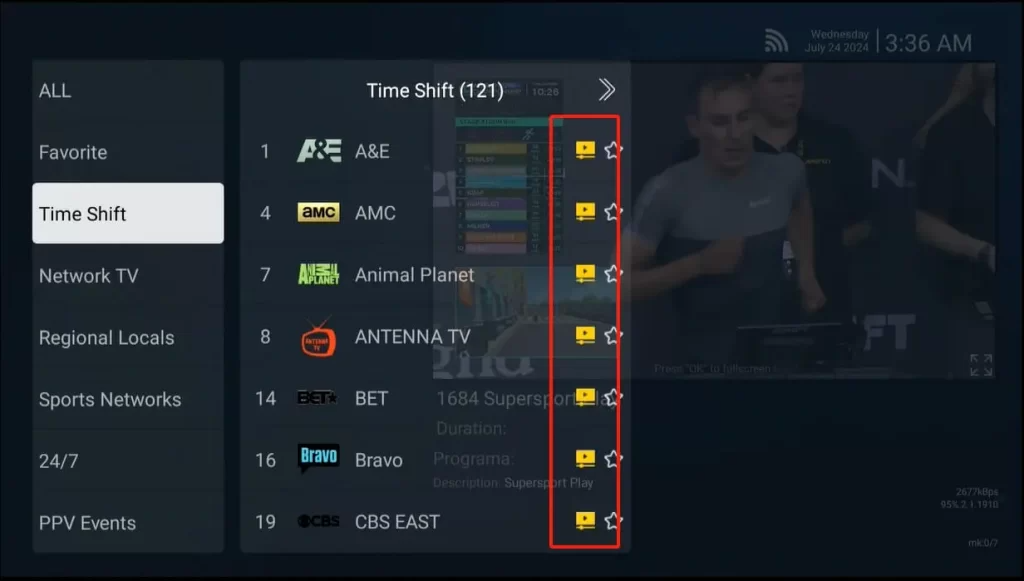
SUPERBOX Channels with Time Shift
This function is supported by nearly all major sports and news channels. The complete list can be viewed by browsing the Time Shift category.
2. Navigate to the Channel and select Time-Shift.
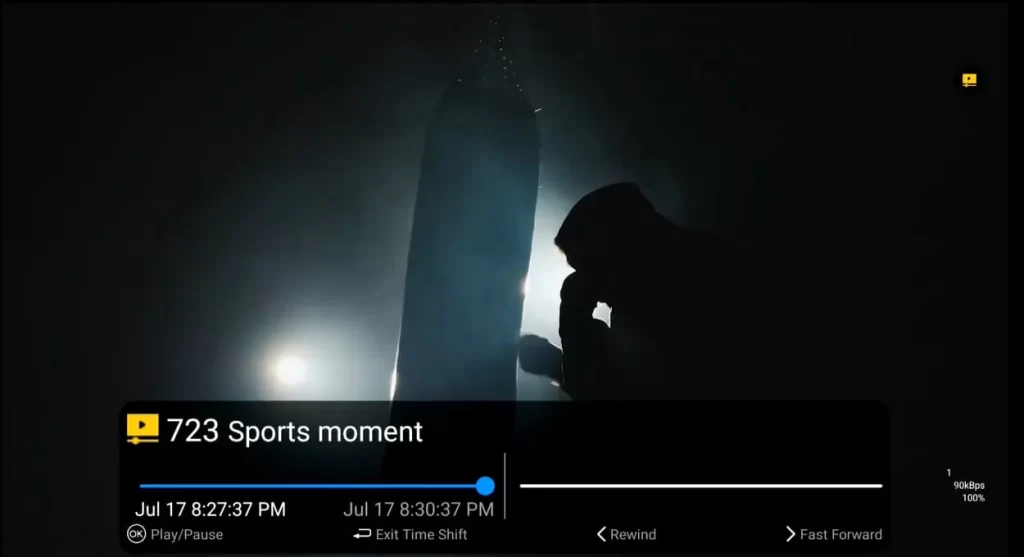
Press Left Button to turn into the Time Shift mode
To switch to the Time Shift mode, press the Left button on your remote control. A second toggle bar will appear on the left side.
3. Press Left/Right button to rewind/fast forward
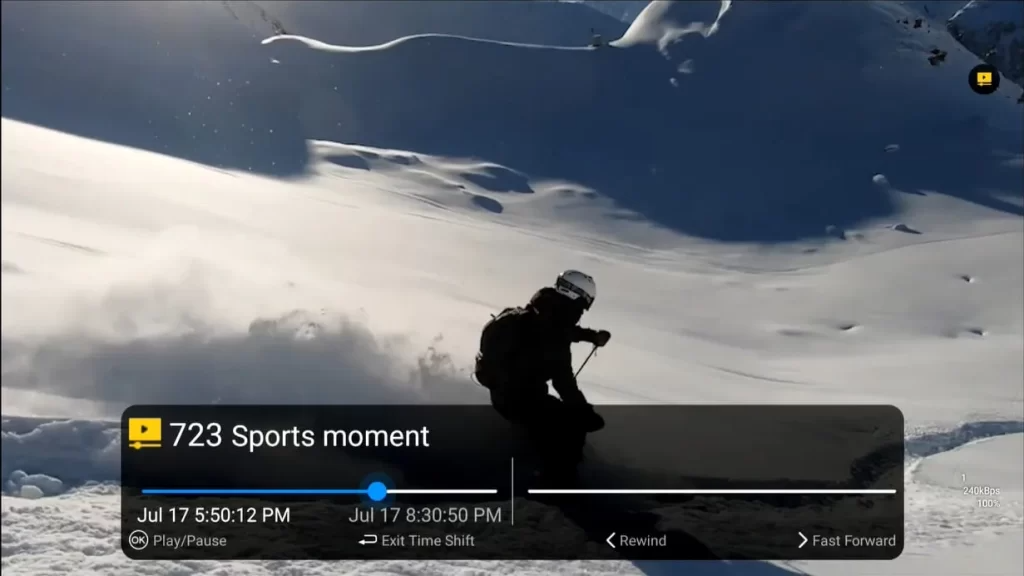
Press Left/Right buttons to Rewind/Fast Forward
You can modify the timeline to view the program you want by pressing the left button to go backwards and the right button to go forwards. Because it takes some time to upload to the cloud server, you can only begin watching from about two minutes ago.
4. Press OK button to pause/resume live TV
If you have things to do, you can pause live TV by pressing the OK button. Additionally, you can continue live TV in time-shift mode by pressing the OK button once more.
5. To exit the Time Shift feature, press the exit button twice
Press the Return button to go back to the live streaming.
SUPERBOX TV Channel List that contains Time Shift function
| A&E | AMC | Animal Planet | ANTENNA TV |
| BET | Bravo | CBS EAST | Cheddar Business |
| ISCOVERY CHANNEL | DISCOVERY SCIENCE | Food Network | FOX Business Network |
| FOX News Channel | HISTORY | Investigation Discovery | ION TV |
| MSNBC | MTV | Nat Geo | OWN |
| Science | TLC | TNT | truTV |
| USA Network | WE tv | ESPN | Fox Sports 1 |
| MLB Network | NBA TV | NBCSN | NFL Network |
| Spectrum Sportsnet | Dodgers | Sports moment | |
| EVENT 01 | EVENT 02 | EVENT 03 | EVENT 04 |
| EVENT 05 | EVENT 06 | EVENT 07 | EVENT 08 |
| EVENT 09 | EVENT 10 | EVENT 11 | EVENT 12 |
| EVENT 13 | EVENT 14 | EVENT 15 | EVENT 16 |
| EVENT 17 | EVENT 18 | EVENT 19 | EVENT 20 |
| EVENT 21 | EVENT 22 | EVENT 23 | EVENT 24 |
| EVENT 25 | |||
| MLB 01 | MLB 02 | MLB 03 | MLB 04 |
| MLB 05 | MLB 06 | MLB 07 | MLB 08 |
| MLB 09 | MLB 10 | MLB 11 | MLB 12 |
| MLB 13 | MLB 14 | MLB 15 | |
| NFL 01 | NFL 02 | NFL 03 | NFL 04 |
| NFL 05 | NFL 06 | NFL 07 | NFL 08 |
| NFL 09 | NFL 10 | NFL 11 | NFL 12 |
| NFL 13 | NFL 14 | NFL 15 | |
| NHL 01 | NHL 02 | NHL 03 | NHL 04 |
| NHL 05 | NHL 06 | NHL 07 | NHL 08 |
| NHL 09 | NHL 10 | NHL 11 | NHL 12 |
| NHL 13 | NHL 14 | NHL 15 | |
| NBA 01 | NBA 02 | NBA 03 | NBA 04 |
| NBA 05 | NBA 06 | NBA 07 | NBA 08 |
| NBA 09 | NBA 10 | NBA 11 | NBA 12 |
| NBA 13 | NBA 14 | NBA 15 |